
Legal Pages With AI
The Legal Pages With AI feature allows you to automatically generate essential legal documents for your website using artificial intelligence. Instead of manually writing complex legal content, AI creates professional legal pages (Privacy Policy, Terms & Conditions, Cookie Policy, etc.) customized for your business and compliant with common legal requirements.
Overview
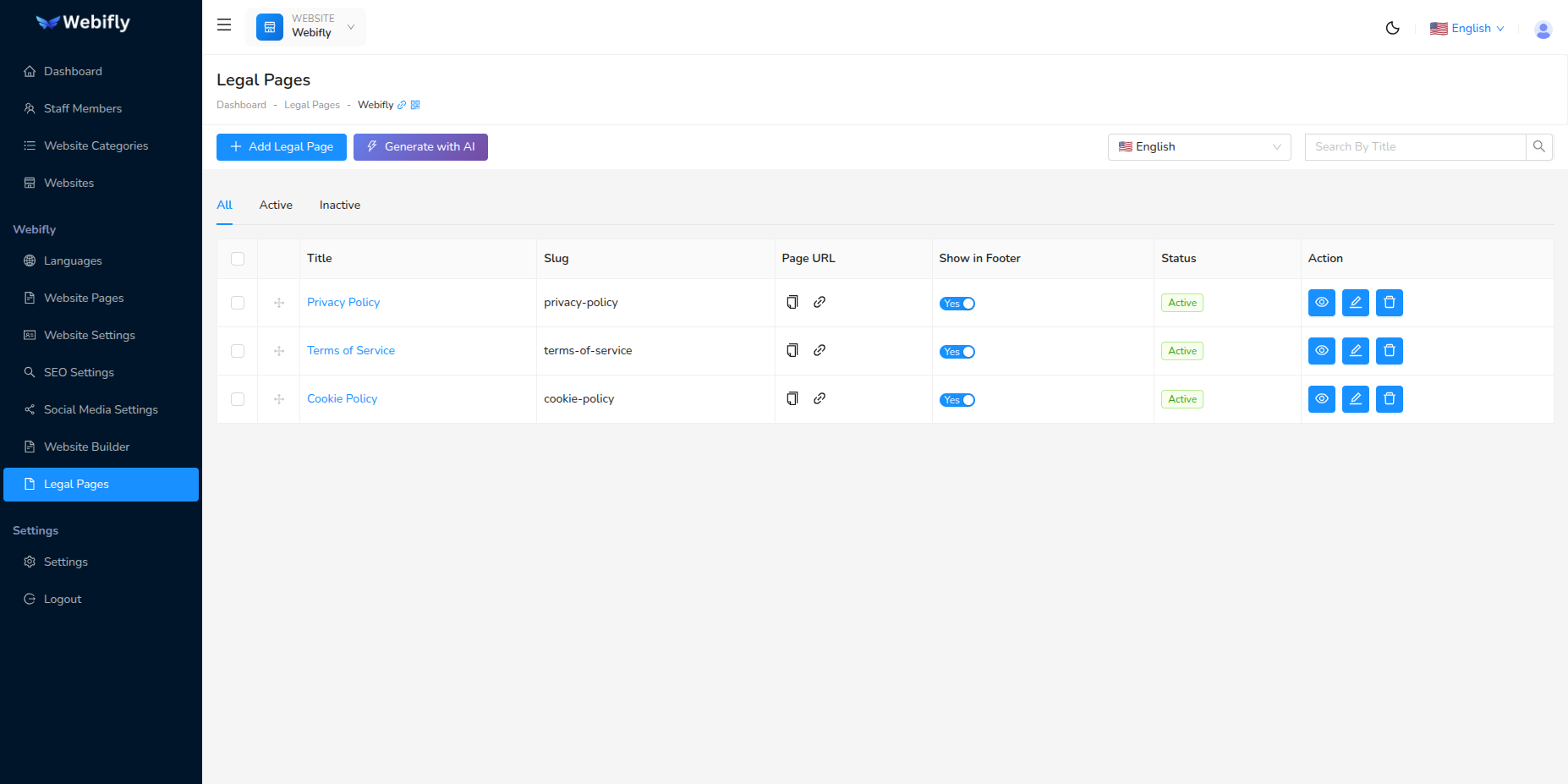
This standalone AI feature generates legal pages separately from the Legal Pages CRUD management system. It's designed specifically for creating legal documents with AI assistance, ensuring professional and comprehensive legal content across all your configured languages.
Key Benefits:
- Generate multiple legal pages in minutes
- Professional legal content tailored to your business
- Multi-language support for all configured languages
- Prevents duplicate slugs automatically
- Saves directly to Legal Pages management
Prerequisites
Before generating legal pages with AI:
- AI Configuration: Configure an AI provider in AI Settings
- Website Selected: Select a website from the website selector
- Languages Configured: Set up at least one language for your website
- Permissions: Ensure you have appropriate permissions for legal pages and AI features
Generation Process
Step 1: Generate Legal Pages
Access the AI legal pages generator from the Legal Pages management screen:
- Navigate to Websites → Legal Pages
- Click the "Generate with AI" button (purple/gradient button)
- AI analyzes your website information: - Website name and category - Business description - Existing legal pages (to prevent duplicates)
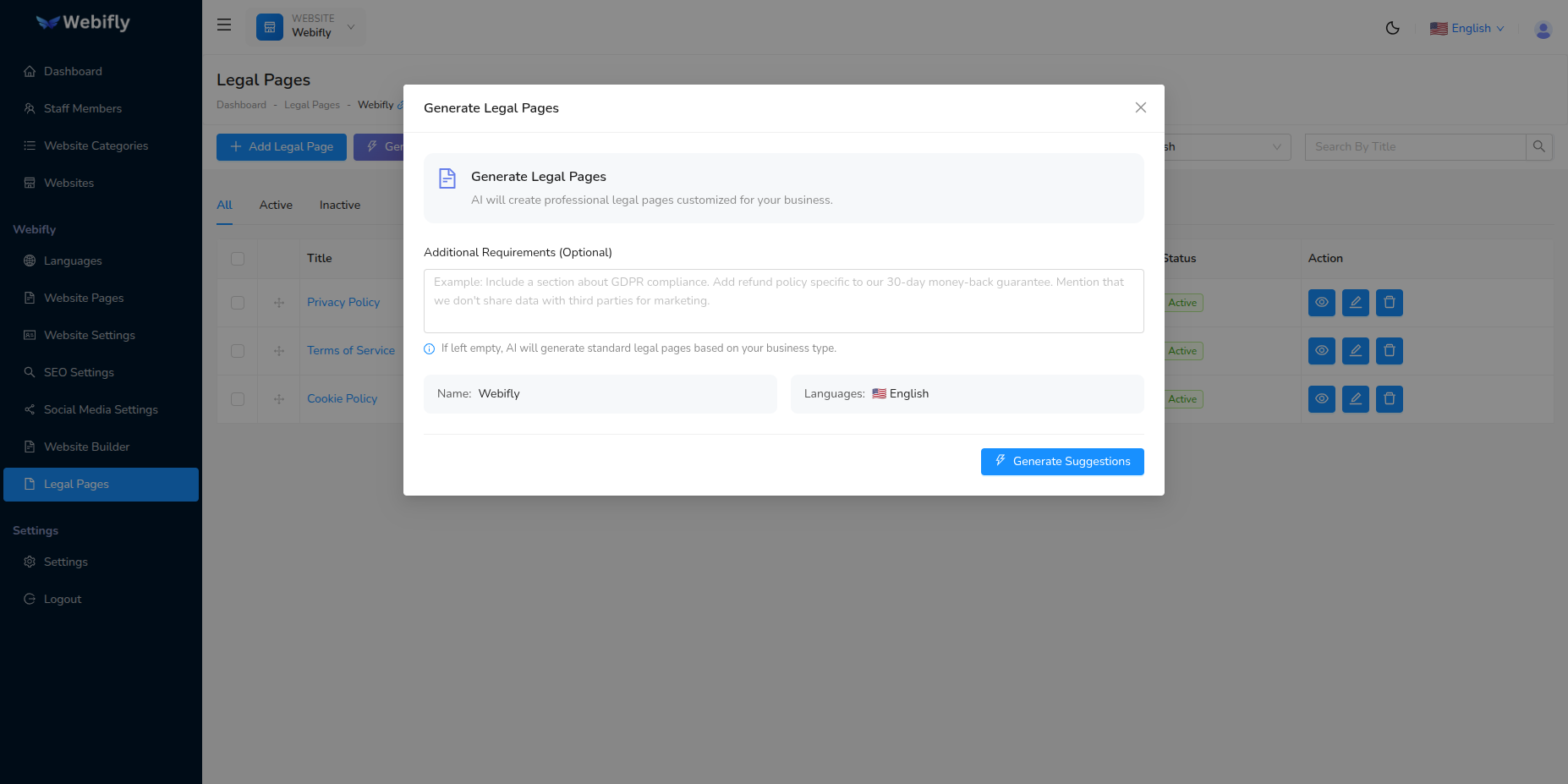
What AI Considers:
- Your business type and category
- Website description and purpose
- Configured languages
- Existing legal page slugs
Step 2: Select Legal Pages
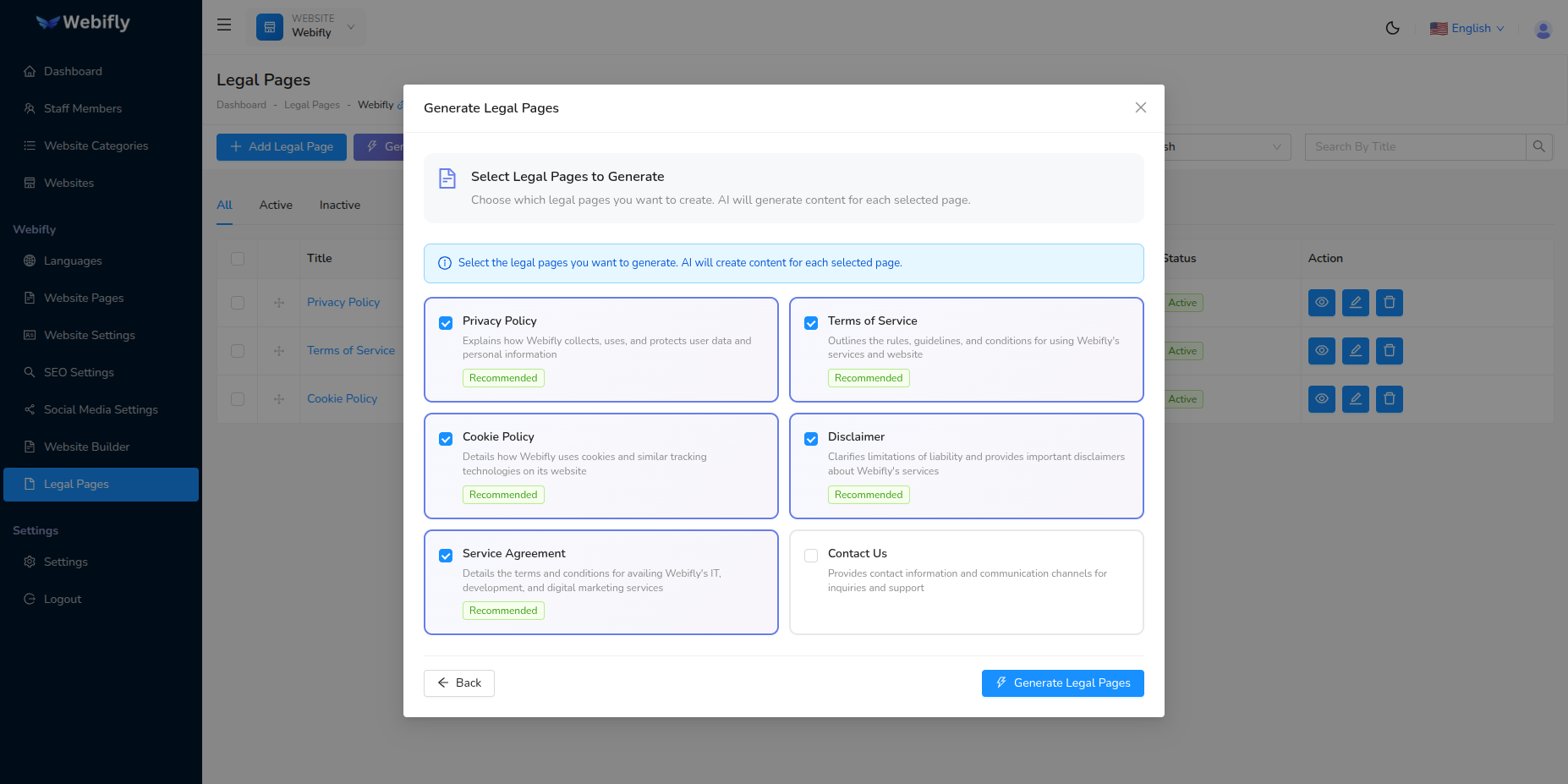
Review and select the legal pages AI suggests:
- Privacy Policy: Data collection and usage policies
- Terms & Conditions: Website usage terms and agreements
- Cookie Policy: Cookie usage and consent information
- Disclaimer: Liability limitations and disclaimers
- Refund Policy: Refund and cancellation terms
- Other legal documents: As suggested by AI
Selection Options:
- Select individual pages you need
- Deselect pages you don't want
- All pages generated in all configured languages
- Unique slugs for each page type
Step 3: Review & Save
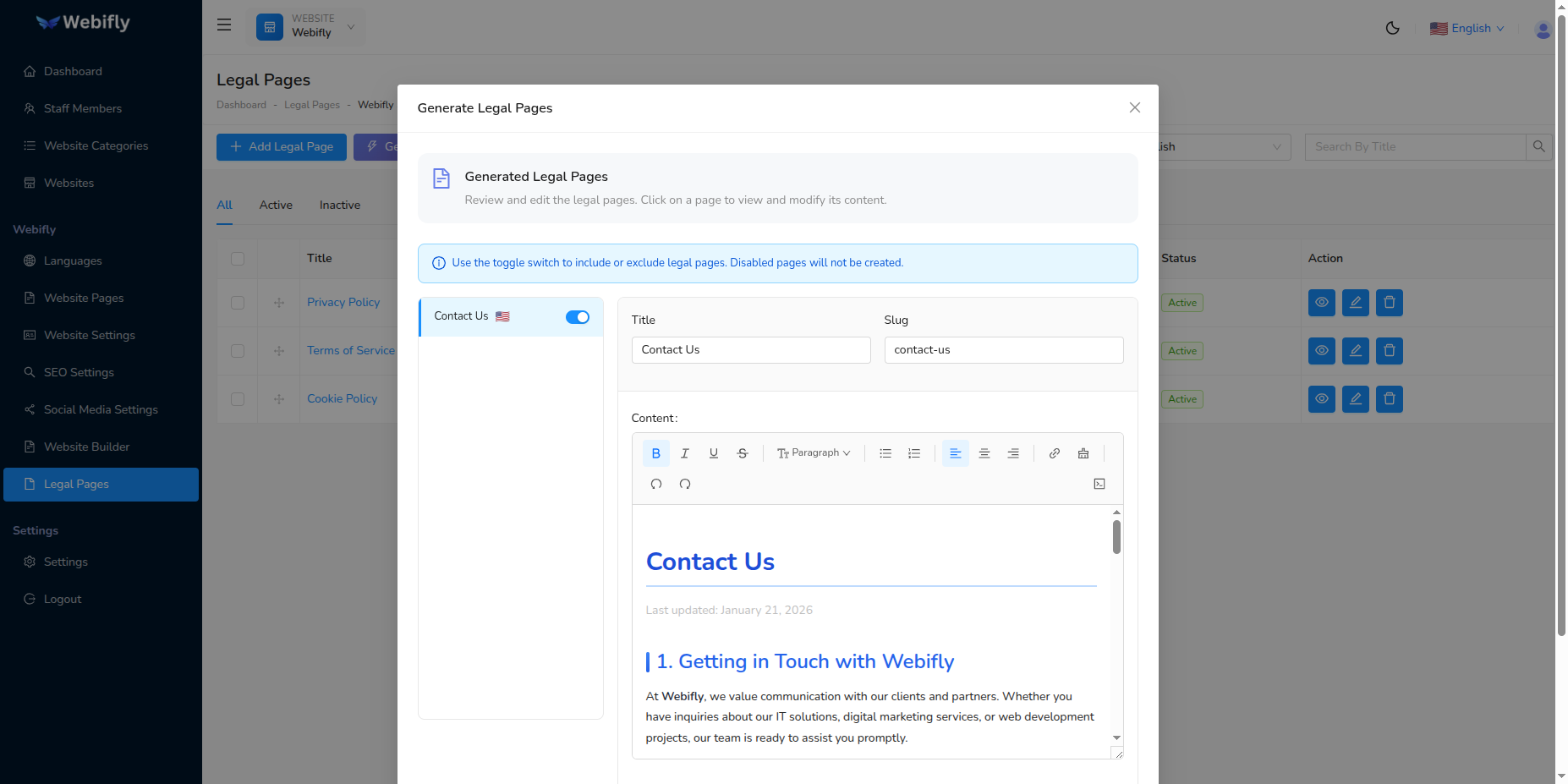
After generation completes:
- Review the suggested legal pages
- Check content preview for each page
- Verify translations in all languages
- Click "Save" to add to Legal Pages management
- Pages appear in the Legal Pages list
- Edit any page if needed in Legal Pages CRUD
Key Features
Intelligent Content Generation
- AI analyzes your business context
- Creates legally appropriate content
- Customizes based on your business category
- Includes relevant legal clauses
Multi-Language Support
- Generates content in all configured languages
- Professional translations for each language
- Maintains consistent legal meaning across languages
- RTL language support included
Duplicate Prevention
- Checks existing legal page slugs
- Prevents duplicate legal documents
- Suggests only missing legal pages
- Maintains slug uniqueness
Direct Integration
- Saves directly to Legal Pages management
- Appears in the legal pages list immediately
- Full editing capability after generation
- Manageable through standard Legal Pages CRUD
Managing Generated Legal Pages
After AI generates legal pages, manage them through Legal Pages CRUD:
Available Actions:
- Edit: Modify content, title, or settings
- View: Preview the full legal page content
- Toggle Footer: Show/hide in website footer
- Reorder: Drag and drop to change display order
- Status: Mark as active or inactive
- Delete: Remove unwanted legal pages
Legal Page Properties:
- Title (multi-language)
- Content (rich text, multi-language)
- Slug (URL identifier)
- Status (active/inactive)
- Show in Footer toggle
- Display order
- Meta description for SEO
Best Practices
When to Use Legal Pages With AI
Recommended For:
- New websites needing legal documents
- Websites without existing legal pages
- Quick legal content creation
- Multi-language legal documents
- Standard legal requirements
Not Recommended For:
- Highly specialized legal requirements
- Industry-specific regulations (consult lawyer)
- Replacement for legal counsel
Content Review
Important Legal Disclaimer
AI-generated legal content should be reviewed by a qualified legal professional before publication. The AI provides a starting point, but legal requirements vary by jurisdiction, industry, and business model.
Review Checklist:
- Verify all legal clauses are appropriate
- Check compliance with local regulations
- Customize business-specific terms
- Update contact information
- Add jurisdiction-specific clauses
- Consult with legal counsel
After Generation
- Review All Content: Read through each generated legal page
- Customize: Edit to match your specific business practices
- Add Details: Include company name, address, contact info
- Legal Review: Have a lawyer review if needed
- Activate: Set status to active and enable in footer
- Update Regularly: Legal requirements change over time
Limitations
Understanding Limitations
- Not Legal Advice: AI content is informational, not legal advice
- General Content: May not cover industry-specific regulations
- Jurisdiction: May not address all local legal requirements
- Updates: Legal requirements change; regular updates needed
- Review Required: Always have legal professional review
Professional Review Recommended:
- High-risk industries (finance, healthcare, legal services)
- International businesses with complex compliance
- Businesses handling sensitive personal data
- E-commerce with specific refund policies
Troubleshooting
Generation Fails
Solutions:
- Verify AI provider is configured correctly
- Check API key validity and credits
- Ensure website information is complete
- Try again with different AI provider
Content Not in Expected Language
Solutions:
- Verify language is configured in Website Languages
- Check language is set as active
- Regenerate with correct language selection
- Edit content manually if needed
Duplicate Legal Pages
Solutions:
- System checks existing slugs automatically
- If duplicates occur, delete one version
- Check slug field for uniqueness
- Use Legal Pages CRUD to manage duplicates
Content Too Generic
Solutions:
- Edit the generated content with specific details
- Add your company information manually
- Customize clauses for your business model
- Use as a starting template only
Cost Considerations
Token Usage:
- Per Legal Page: ~2000-4000 tokens depending on complexity
- Full Set: 10,000-20,000 tokens for 4-5 legal pages
- Multi-Language: Multiply by number of languages
Tips to Reduce Costs:
- Generate only legal pages you actually need
- Start with one language, add translations manually if cheaper
- Use AI for complex pages (Privacy Policy, Terms), write simple ones manually
- Generate once and edit rather than regenerating
Frequently Asked Questions
Q: Can I edit AI-generated legal pages? A: Yes, edit any content in Legal Pages CRUD after generation.
Q: Are these legal pages legally binding? A: They should be reviewed by a legal professional before use.
Q: Can I generate legal pages multiple times? A: Yes, but duplicate slugs are prevented. Delete old versions first.
Q: What legal pages are generated? A: AI suggests relevant pages based on your business (Privacy Policy, Terms, Cookie Policy, etc.).
Q: Do I need all the suggested legal pages? A: Select only the pages relevant to your website and jurisdiction.
Q: Can I add custom legal pages? A: Yes, use Legal Pages CRUD to create custom legal documents.
Q: Will pages appear in website footer automatically? A: No, toggle "Show in Footer" for each page in Legal Pages management.
Q: Can I change the order of legal pages in footer? A: Yes, drag and drop pages in Legal Pages list to reorder.
Q: What if my jurisdiction has specific requirements? A: Edit the generated content and add jurisdiction-specific clauses, or consult legal counsel.
Q: How often should I update legal pages? A: Review and update whenever business practices change or regulations update.