
Contact Queries
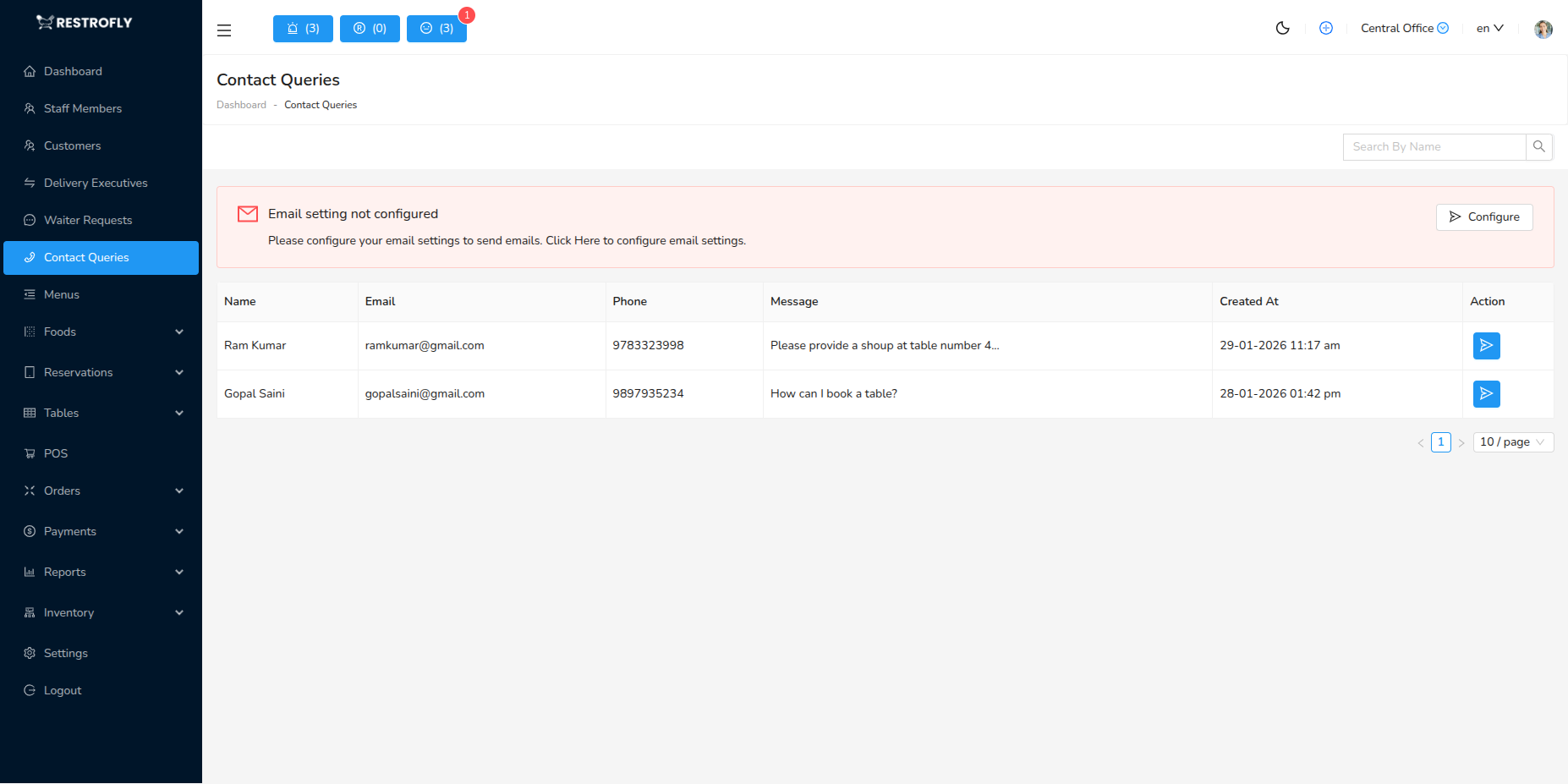
View and manage customer inquiries submitted through your restaurant's website contact form. Navigate to Contact Queries to access all customer messages.
Overview
When customers submit inquiries through the "Contact Us" form on your restaurant website, their messages are stored in the Contact Queries module. This centralized system ensures no customer inquiry goes unanswered.
Contact Query List
The list displays all customer queries with the following information:
Query Details
- Name: Customer's name
- Email: Customer's email address
- Phone: Customer's phone number (if provided)
- Message: The inquiry or feedback submitted
- Date: When the query was submitted
Search Functionality
- Search by customer name
- Filter by date range
- Quick access to specific queries
Types of Queries
Customers typically use the contact form for:
General Inquiries
- Operating hours and location
- Menu questions
- Dietary restrictions and allergen information
- Parking and accessibility
Reservations & Events
- Large party reservations
- Private event bookings
- Catering inquiries
- Special occasion arrangements
Feedback
- Compliments and positive reviews
- Complaints and concerns
- Suggestions for improvement
- Service quality feedback
Business Inquiries
- Corporate catering
- Partnership opportunities
- Media and press inquiries
- Job applications
Managing Contact Queries
Viewing Query Details
- Click on a query to view full message
- Long messages are truncated in list view
- Full details available in expanded view
Responding to Queries
- Contact queries are view-only in the admin panel
- Copy customer email to respond via your email client
- Or call customer using provided phone number
- No built-in reply feature (use external email)
Record Keeping
- All queries are preserved in the database
- Useful for tracking customer concerns and trends
- Reference for dispute resolution
- Historical record of customer communication
Best Practices
Response Time
- Check contact queries daily (at minimum)
- Respond within 24 hours for best customer service
- Prioritize urgent queries (complaints, immediate needs)
- Set up email notifications if available
Professional Responses
- Address customer by name
- Thank them for reaching out
- Provide clear, helpful answers
- Include contact information for follow-up
Query Categories
- Mentally categorize queries by type
- Route to appropriate staff (reservations to host, complaints to manager)
- Track common questions to update website FAQ
- Note recurring issues for operational improvement
Follow-Up
- For complex inquiries, confirm receipt and provide timeline
- Follow up to ensure customer satisfaction
- Keep records of promises made
- Close loop on all queries
Data Usage
- Analyze common questions to improve website information
- Identify service gaps from feedback
- Use positive feedback for marketing (with permission)
- Address recurring complaints systematically
Privacy
- Treat customer contact information confidentially
- Don't share with third parties without consent
- Secure access to contact queries module
- Comply with privacy regulations
Team Management
- Assign responsibility for monitoring queries
- Train staff on professional communication
- Establish response templates for common questions
- Escalate complaints to management
Improve Website Content
If you receive many queries asking the same questions (operating hours, menu items, parking), add this information prominently to your website to reduce repetitive inquiries.
Urgent Queries
Some queries require immediate attention (complaints, urgent reservation requests, health concerns). Check contact queries multiple times per day during business hours to catch time-sensitive messages.
Customer Feedback
Contact queries are valuable customer feedback. Positive feedback validates your efforts, while constructive criticism helps you improve. Read all feedback carefully and take action on valid concerns.
Email Integration
Receiving Notifications
- Configure email notifications for new contact queries
- Receive alerts to your email when customers submit forms
- Never miss an inquiry even when not in admin panel
Email Response
- Copy customer email from query
- Compose professional response in your email client
- CC relevant team members
- Keep email records organized
Template Responses
- Create email templates for common queries
- Personalize each response
- Include restaurant contact information
- Add call-to-action (visit website, make reservation)