
Meal Types
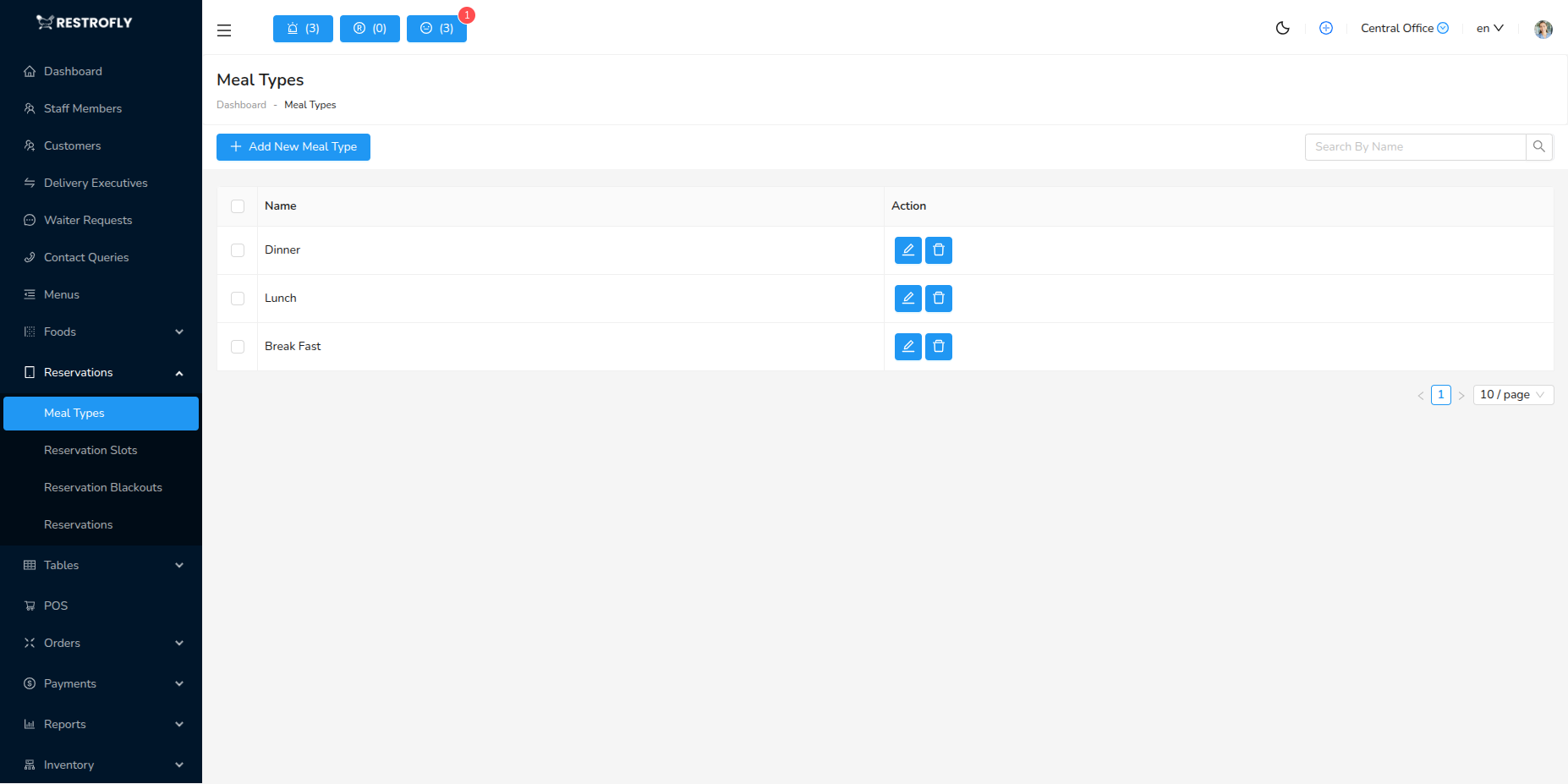
Meal Types define time-based service periods for reservations, such as Breakfast, Lunch, Dinner, Brunch, etc. Navigate to Reservations → Meal Types to configure meal times.
Overview
Meal Types organize your reservation system by service times. They define when each meal period occurs and how slots are allocated during that time.
Creating a Meal Type
Click Add Meal Type to create a new meal service period.
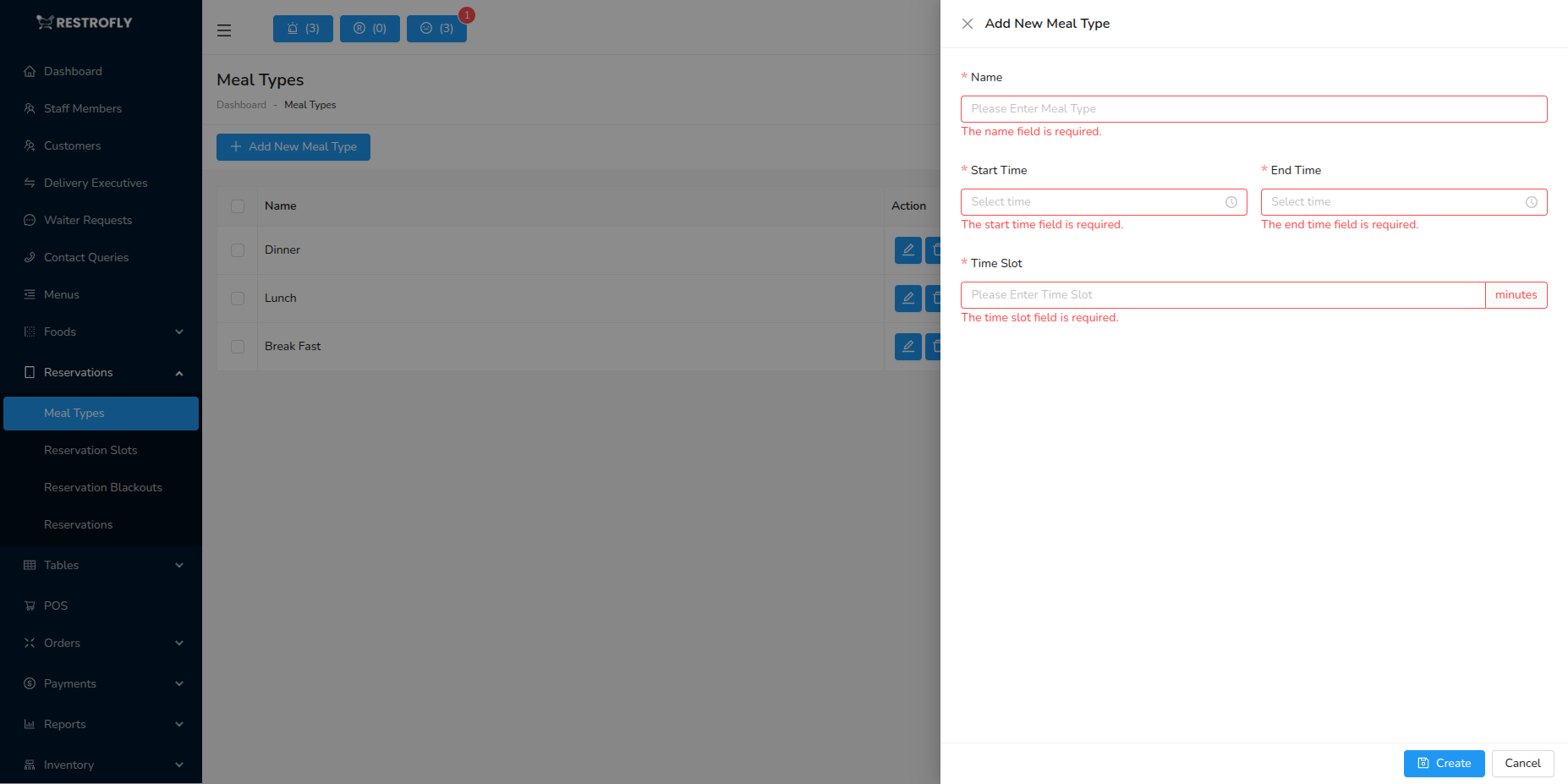
Name (Required)
- Name of the meal service
- Common examples:
- Breakfast
- Brunch
- Lunch
- Afternoon Tea
- Dinner
- Late Night Dining
- Keep names clear and customer-friendly
Start Time (Required)
- When this meal service begins
- Format: 24-hour time (e.g., 09:00, 14:00, 18:00)
- Examples:
- Breakfast: 07:00
- Lunch: 11:30
- Dinner: 17:00
End Time (Required)
- When this meal service ends
- Format: 24-hour time
- Must be after Start Time
- Examples:
- Breakfast: 11:00
- Lunch: 15:00
- Dinner: 22:30
Time Slot (Minutes) (Required)
- Duration of each reservation slot in minutes
- Common values: 30, 60, 90, 120 minutes
- Examples:
- Fast casual: 30-60 minutes
- Casual dining: 60-90 minutes
- Fine dining: 90-120 minutes
- Determines how many reservations fit in the time window
- Affects table turnover rate
Meal Type List View
The list displays:
- Name: Meal service name
- Start Time: Service begins
- End Time: Service ends
- Time Slot: Reservation duration in minutes
- Actions: Edit, Delete buttons
How Meal Types Work
Slot Calculation
- System divides the time range into slots based on Time Slot setting
- Example: Dinner 18:00-22:00 with 90-minute slots:
- Slot 1: 18:00-19:30
- Slot 2: 19:30-21:00
- Slot 3: 21:00-22:30
- Customers can book any available slot
Customer Booking Flow
- Customer selects Meal Type (Lunch, Dinner)
- System shows available slots within that meal time
- Customer picks slot and table
- Reservation confirmed for that specific time
Multiple Meal Types
- Can have multiple meal types per day
- Example daily schedule:
- Breakfast: 07:00-11:00
- Lunch: 11:30-15:00
- Dinner: 17:00-22:30
- No overlap recommended between meal types
Common Meal Type Configurations
Casual Restaurant
- Breakfast: 07:00-11:00, 60-minute slots
- Lunch: 11:30-15:00, 60-minute slots
- Dinner: 17:00-22:00, 90-minute slots
Fine Dining
- Lunch Service: 12:00-14:30, 120-minute slots
- Dinner Service: 18:00-23:00, 150-minute slots
Café / Brunch Spot
- Breakfast: 07:00-10:30, 45-minute slots
- Brunch: 10:00-14:00, 75-minute slots
- Light Lunch: 12:00-16:00, 60-minute slots
All-Day Dining
- All Day: 10:00-22:00, 90-minute slots
- (Single meal type for simpler reservation system)
Best Practices
Realistic Time Slots
- Set slot duration based on actual dining time
- Include time for ordering, eating, and table turnover
- Fine dining needs longer slots than fast casual
- Monitor actual times and adjust accordingly
Non-Overlapping Times
- Avoid overlap between meal types when possible
- Clear separation between Lunch and Dinner
- Prevents booking confusion
Buffer Times
- Consider 30-minute buffer between meal services
- Allows staff to prepare and reset
- Lunch ends at 15:00, Dinner starts at 17:00 (2-hour buffer)
Peak Hour Management
- Shorter slots during peak times = more turnover
- Longer slots during slower times = better experience
- Example: 60-min lunch slots vs 90-min dinner slots
Seasonal Adjustments
- Adjust times seasonally if needed
- Summer: Later dinner times
- Winter: Earlier dinner times
- Weekend brunch service
Clear Communication
- Meal type names should be self-explanatory
- Display times clearly to customers
- Mention slot duration in booking confirmation
Slot Duration Strategy
Shorter slots = more reservations but rushed feel. Longer slots = fewer reservations but better experience. Find the balance that matches your service style and profitability goals.
Overlapping Meal Types
Avoid overlapping meal types (e.g., Lunch 12:00-15:00 and Afternoon Tea 14:00-17:00). This causes confusion in slot availability and table management.