
Delivery Executives
Manage your delivery personnel and track their performance in the Delivery Executives module. Navigate to Staff Members → Delivery Executives to manage your delivery team.
Overview
Delivery Executives are staff members responsible for delivering orders to customers. This module helps you manage delivery personnel, track their deliveries, and monitor performance.
Adding a Delivery Executive
Click Add Delivery Executive to create a new delivery personnel record.
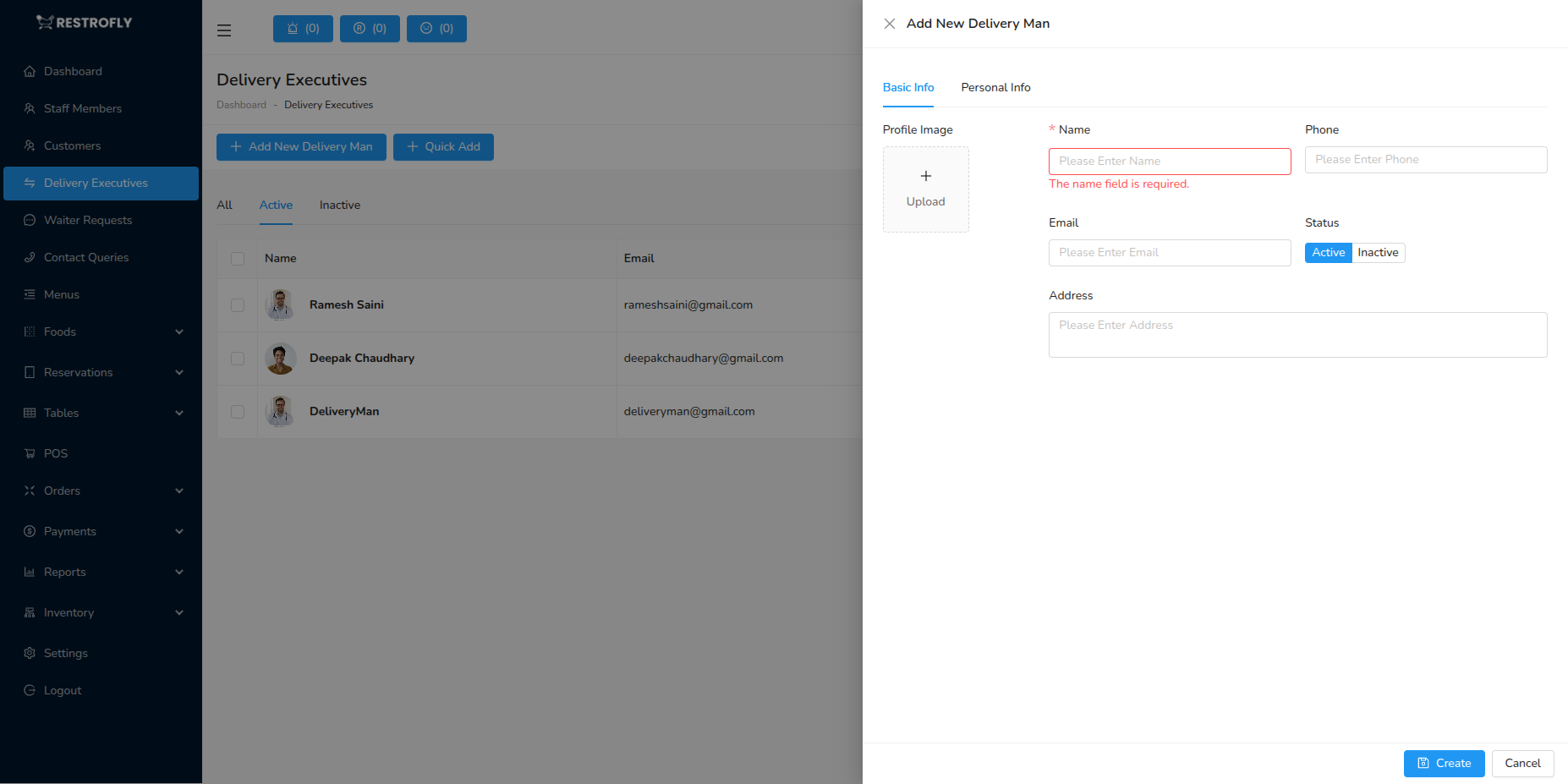
Profile Image
- Upload delivery executive photo
- Helps customers identify delivery person
- Useful for security and verification
Name (Required)
- Full name of the delivery person
- Example: "David Martinez", "Lisa Wong"
- Displayed on delivery tracking
Working Phone (Required)
- Contact number for delivery coordination
- Used for customer communication during delivery
- Must be reachable during delivery hours
Working Email
- Email for notifications and reports
- Optional but useful for digital communication
Status (Required)
- Active: Available for delivery assignments
- Inactive: Not available (off-duty, terminated, suspended)
Allow Login
- Enable if delivery executive needs system access
- Allows them to view assigned deliveries
- Useful if using mobile app for delivery management
Password (If Allow Login enabled)
- Set login password
- Required for system/app access
- Delivery executive can change after first login
Role
- Assign "Delivery Executive" or similar role
- Controls what system features they can access
- Typically limited to delivery-related functions only
Address
- Home address of delivery executive
- Useful for HR and emergency contact
Personal Information
Similar to staff members, you can collect:
- Gender
- Date of Birth
- Personal Email
- Personal Phone
- Marital Status
Mobile App Integration
If your system includes a delivery executive mobile app, enable "Allow Login" and provide login credentials so they can view assigned deliveries, update delivery status, and navigate to customer locations.
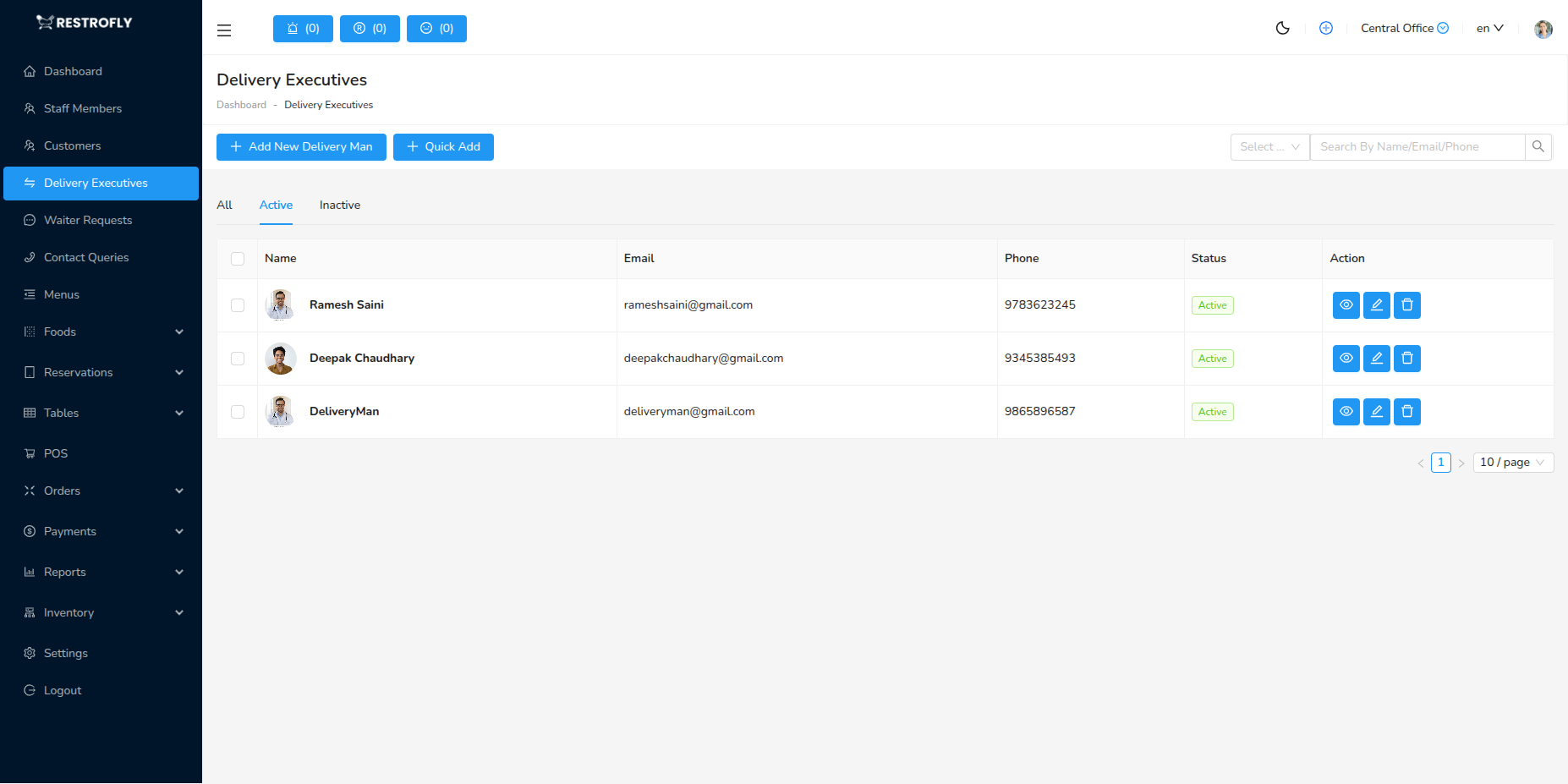
Delivery Executive List
The list displays:
- Profile Photo
- Name
- Phone
- Status: Active or Inactive
- Created At
- Actions: View, Edit, Delete
Tabs
- All: All delivery executives
- Active: Currently active delivery personnel
- Inactive: Inactive or former delivery executives
Managing Delivery Executives
Assigning Deliveries
- Deliveries can be assigned manually or automatically
- Active delivery executives appear in assignment dropdown
- Track how many deliveries each person is handling
Performance Tracking
- View total deliveries completed
- Track on-time delivery rate
- Monitor customer feedback
- Calculate delivery commissions if applicable
Scheduling
- Set delivery executive availability
- Manage shifts and off-days
- Assign specific zones or areas if applicable
Best Practices
Onboarding
- Verify identity and documentation
- Provide training on customer service
- Set up system/app access
- Assign delivery zones if applicable
Communication
- Ensure phone number is always reachable
- Provide clear delivery instructions
- Establish communication protocols
- Use app/system for real-time tracking
Performance Management
- Track delivery times and accuracy
- Monitor customer feedback and ratings
- Recognize top performers
- Provide training for improvement areas
Safety & Security
- Verify identity documents
- Provide safety equipment if needed
- Track delivery routes
- Establish emergency protocols
Fair Distribution
- Distribute deliveries fairly among active executives
- Consider distance and delivery capacity
- Rotate peak hour assignments
Status Management
- Set to Inactive when off-duty or on leave
- Update status in real-time during shifts
- Don't delete executives who have delivery history
Zone-Based Assignment
If you serve a large area, consider assigning delivery executives to specific zones. This reduces travel time, increases efficiency, and improves delivery speed.
Background Checks
For customer safety and brand protection, conduct appropriate background checks on delivery executives before hiring. Verify identity documents and references.