
Customers
The Customers module allows you to manage your restaurant's customer database, track customer orders, and maintain customer relationships. Navigate to Staff Members → Customers to access customer management.
Overview
Customers are individuals who order from your restaurant. This module helps you maintain customer records, track order history, and provide personalized service. Customers can also register on the front-end website and place orders online.
Adding a New Customer
Click Add Customer to create a new customer record.
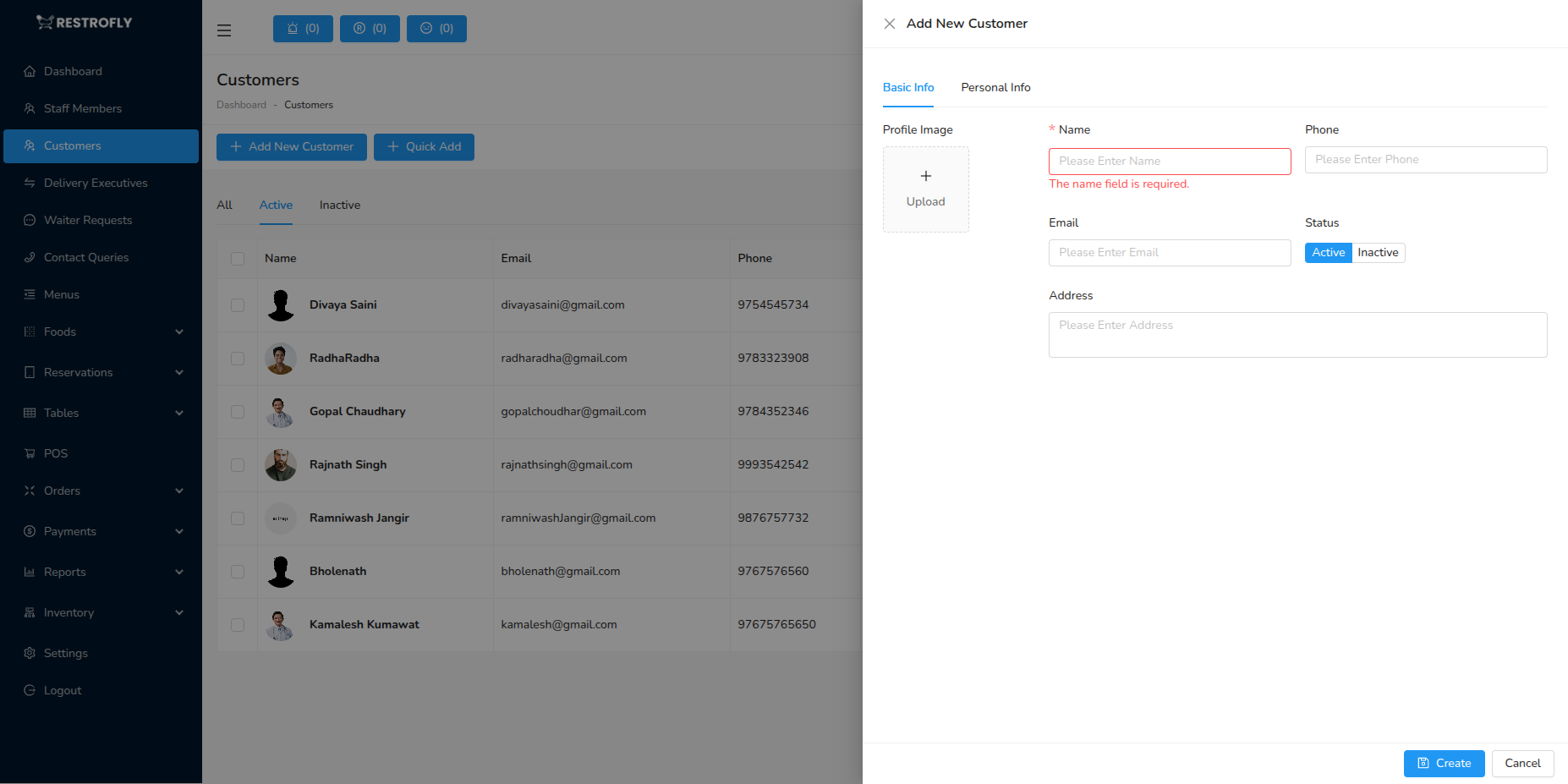
Profile Image
- Upload customer photo (optional)
- Helps with customer recognition for regulars
- Useful for personalized service
Name (Required)
- Full name of the customer
- Example: "Michael Chen", "Emily Roberts"
- Used for orders and reservations
Working Phone (Required)
- Primary contact number
- Used for order confirmations and delivery
- Should be unique for each customer
Working Email
- Email address for communication
- Used for order confirmations and marketing
- Optional but recommended
Status (Required)
- Active: Customer can place orders
- Inactive: Customer account is disabled
- Set to Inactive for blocked or problematic customers
Address (Optional)
- Delivery address for the customer
- Can store multiple addresses if system supports it
- Essential for delivery orders
Personal Information
Gender
- Male, Female, or Other
- Optional, useful for personalized marketing
Date of Birth
- Customer's birthday
- Used for birthday promotions and offers
- Optional but valuable for customer engagement
Personal Email
- Alternative email address
- Useful if working email changes
Personal Phone
- Secondary contact number
- Backup for delivery issues
Customer Registration
Customers can self-register on your restaurant website/app. These registrations automatically appear in the Customers module. You can also manually add walk-in customers.
Customer List View
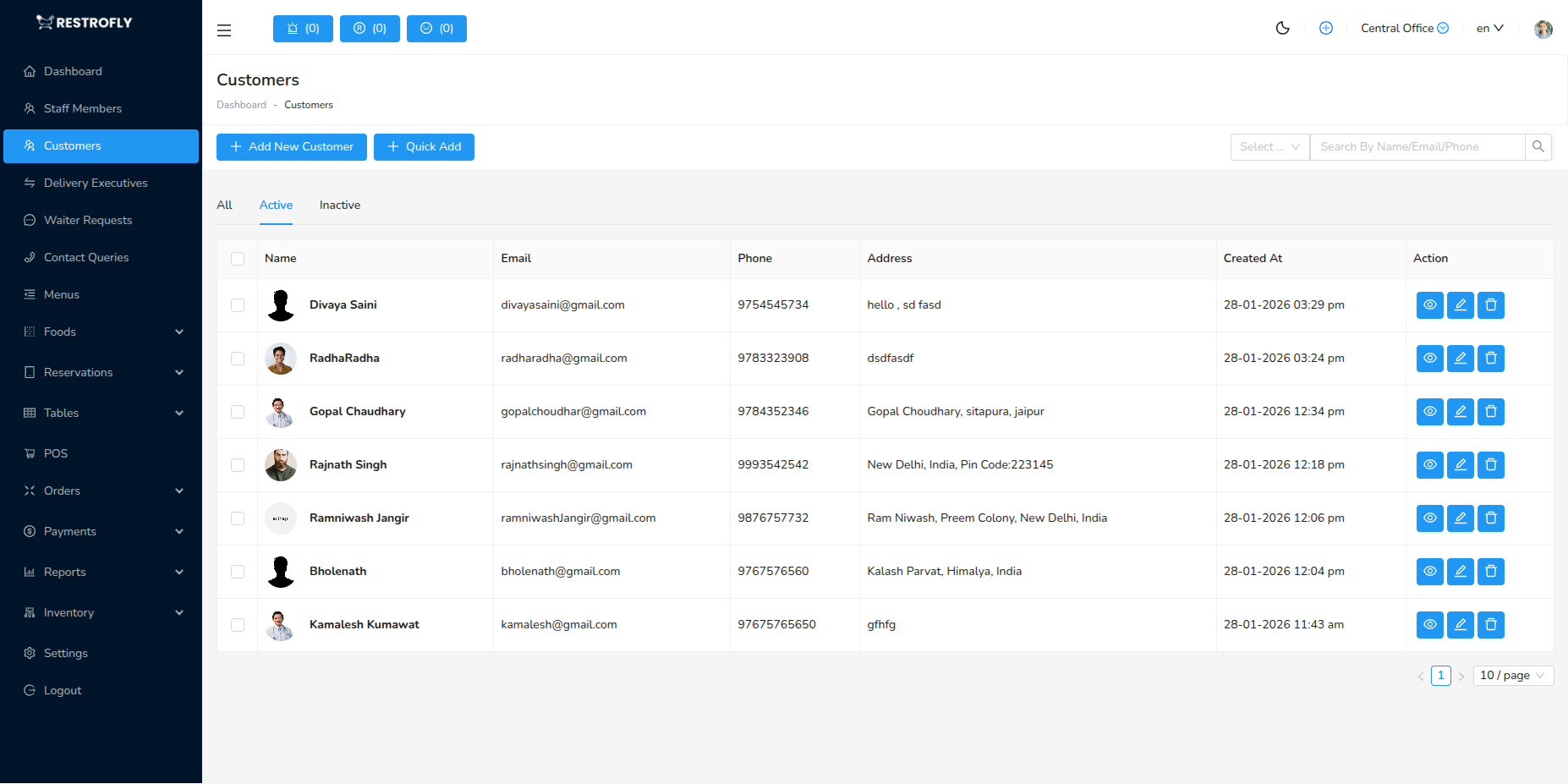
The customer list displays:
- Profile Photo: Customer image (if uploaded)
- Name: Customer name
- Email: Contact email
- Phone: Contact number
- Status: Active or Inactive badge
- Created At: Date customer was added
- Actions: View, Edit, Delete
Tabs
- All: All customers
- Active: Active customers only
- Inactive: Inactive customers
Search
- Search by name, email, or phone number
- Quickly find customers during order taking
Managing Customers
Viewing Customer Details
- Click View to see complete customer profile
- View order history
- View reservation history
- Check customer preferences and notes
Editing Customer Information
- Click Edit to modify customer details
- Update contact information
- Change status if needed
- Add notes about customer preferences
Customer Status
- Active: Normal operation, can place orders
- Inactive: Blocked or suspended, cannot place orders online
- Use Inactive status for problematic customers or at customer request
Customer Order History
Each customer profile shows:
- Total orders placed
- Total amount spent
- Last order date
- Favorite items
- Preferred payment methods
This data helps you:
- Provide personalized service
- Offer targeted promotions
- Recognize and reward loyal customers
- Resolve complaints with context
Best Practices
Data Collection
- Collect customer information during first order
- Ask for email and phone for better service
- Don't make unnecessary fields mandatory
Privacy & Consent
- Obtain consent before adding to marketing lists
- Respect customer privacy
- Comply with data protection regulations (GDPR, etc.)
Customer Service
- Use customer history to provide personalized service
- Remember preferences and special requests
- Recognize returning customers by name
Data Quality
- Verify phone numbers and emails
- Remove or merge duplicate customer records
- Keep information up to date
Marketing
- Use customer data for targeted promotions
- Send birthday offers
- Reward loyal customers with special deals
Security
- Don't store sensitive payment information
- Protect customer data from unauthorized access
- Regularly audit customer data access
Loyalty Programs
Use customer order history and total spending data to identify VIP customers and offer loyalty rewards. This encourages repeat business and increases customer lifetime value.
Customer Privacy
Customer data is sensitive. Ensure you have proper consent to collect and use customer information. Never share customer data with third parties without explicit consent.