
Reservations
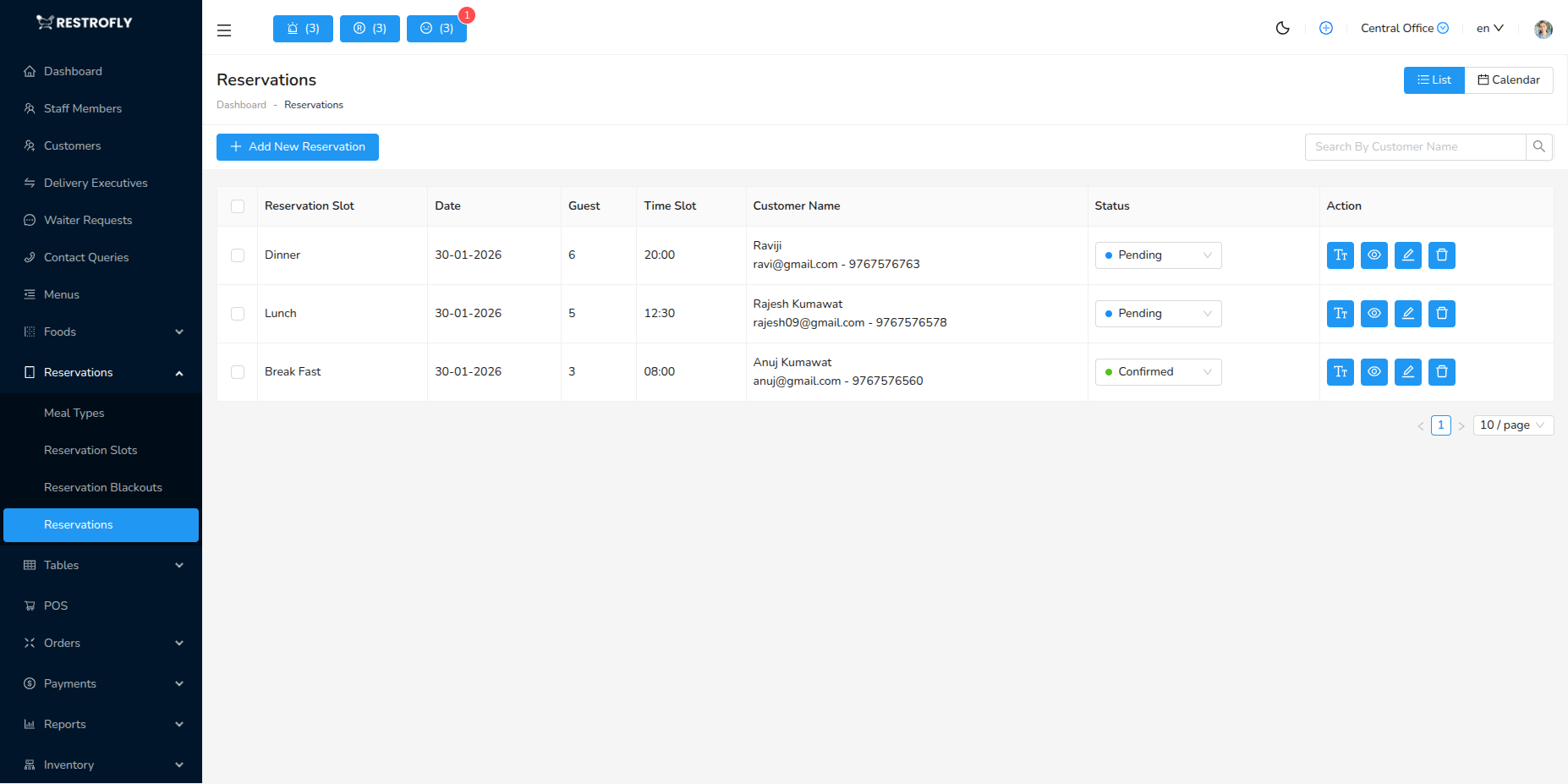
Manage all table reservations from both customer bookings and admin-created reservations. Navigate to Reservations → Reservations to view and manage bookings.
Overview
The Reservations module is your central hub for managing all table bookings. Reservations can come from customer bookings via website/app or be created manually by staff for phone/walk-in bookings.
Creating a Manual Reservation
Click Add Reservation to create a booking on behalf of a customer.
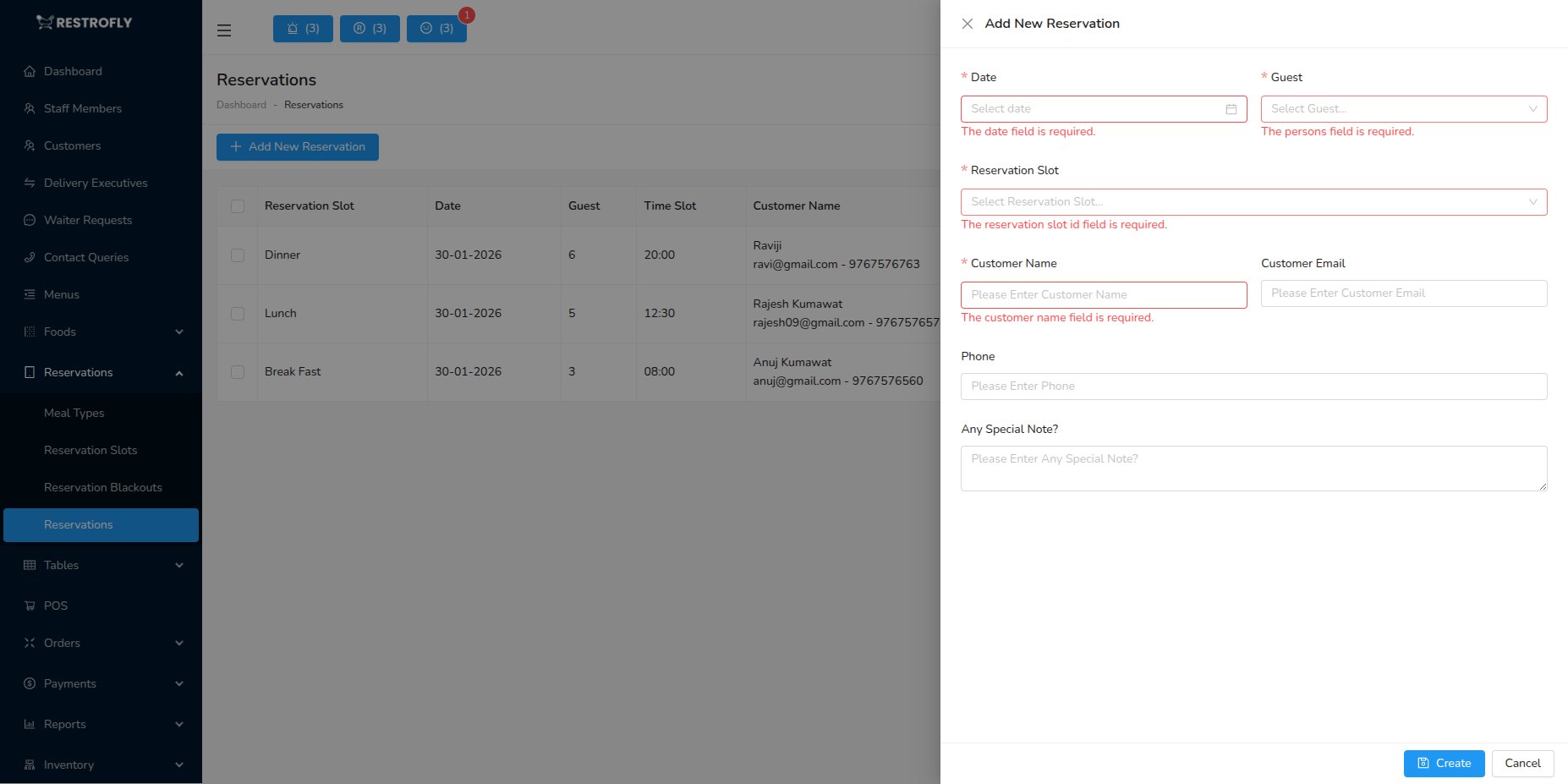
Customer Selection (Required)
- Search and select existing customer
- Or create new customer on the fly
- Enter customer name, phone, email
- Customer details required for confirmation
Date (Required)
- Date of reservation
- Cannot book past dates
- Check availability before selecting
- Calendar picker for easy selection
Meal Type (Required)
- Select service period: Breakfast, Lunch, Dinner
- Based on configured Meal Types
- Determines available time slots
- Filter: Only dates with that meal service
Time Slot (Required)
- Select specific reservation time
- Dropdown shows available slots for selected date & meal type
- Example: 19:00, 19:30, 20:00
- Only unblocked, available slots shown
Number of Guests (Required)
- How many people in the party
- Example: 2, 4, 6, 8
- Used to assign appropriate table
- Affects table availability
Table Selection (Required)
- Select specific table for reservation
- Dropdown filtered by:
- Date and time availability
- Table capacity matching guest count
- Area/section if specified
- Shows table code and capacity
- Example: "Table 5 (Capacity: 4)"
Special Requests (Optional)
- Customer notes or special requirements
- Examples:
- "Window seat preferred"
- "Birthday celebration - need cake service"
- "Wheelchair accessible seating"
- "Child high chair needed"
- "Allergies: Peanuts, Shellfish"
- Visible to front-of-house staff
- Helps prepare for customer arrival
Status (Required)
- Pending: Awaiting confirmation
- Confirmed: Reservation confirmed, table reserved
- Seated: Customer has arrived and been seated
- Completed: Service finished, table cleared
- Cancelled: Reservation cancelled
- No Show: Customer didn't arrive
Reservations List View
Columns Displayed:
- Reservation ID: Unique booking number
- Customer Name: Who booked
- Date: Reservation date
- Time: Reservation time slot
- Meal Type: Breakfast, Lunch, Dinner
- Table: Assigned table
- Guests: Number of people
- Status: Current status with color badge
- Actions: View, Edit, Cancel, Mark as Seated
Status Badges:
- 🟡 Pending: Yellow
- 🟢 Confirmed: Green
- 🔵 Seated: Blue
- ✅ Completed: Gray/Checkmark
- 🔴 Cancelled: Red
- ⚠️ No Show: Orange
Filters:
- Date Range: Filter by reservation date
- Status: Filter by reservation status
- Meal Type: Filter by service period
- Customer: Search by customer name
- Table: Filter by table number
Tabs:
- Today: Today's reservations only
- Upcoming: Future reservations
- Past: Historical reservations
- All: Complete list
Managing Reservations
Viewing Reservation Details
- Click View to see complete booking info
- Customer contact details
- Full special requests
- Reservation history for this customer
- Previous visits and orders
Editing Reservations
- Click Edit to modify booking
- Can change date, time, table, guest count
- Cannot edit completed or cancelled reservations
- Notify customer if you make changes
Confirming Reservations
- Change status from "Pending" to "Confirmed"
- Triggers confirmation email/SMS to customer (if configured)
- Locks the table for that time slot
- Customer receives booking confirmation
Seating Customers
- When customer arrives, mark as "Seated"
- Updates table status to occupied
- Starts service timer
- Front-of-house knows customer has arrived
Completing Reservations
- After service ends, mark as "Completed"
- Frees table for next booking
- Records customer visit
- Adds to customer history
Cancelling Reservations
- Click Cancel if customer cancels
- Frees table immediately
- Table becomes available for other bookings
- Cancellation reason (optional)
No-Show Tracking
- If customer doesn't arrive, mark as "No Show"
- Tracks no-show rate per customer
- Useful for deciding deposit policies
- Can set rules to block repeat no-shows
Reservation Workflow
1. Booking Received
- Customer books online or staff creates manually
- Status: Pending
- System checks table availability
- Booking number generated
2. Confirmation
- Staff reviews and confirms booking
- Status: Pending → Confirmed
- Confirmation sent to customer
- Table reserved for that time
3. Preparation
- Staff reviews day's reservations in morning
- Check special requests
- Prep tables accordingly
- Inform kitchen of expected volume
4. Customer Arrival
- Customer arrives at restaurant
- Host checks reservation list
- Confirms customer identity
- Status: Confirmed → Seated
- Escorts to assigned table
5. Service
- Normal restaurant service
- Special requests fulfilled
- Order taken and served
- Bill payment
6. Completion
- Customer leaves
- Table cleared and reset
- Status: Seated → Completed
- Table available for next booking
Best Practices
Confirmation Process
- Confirm reservations within 24 hours
- Send confirmation email/SMS
- Include reservation details, date, time, table
- Add calendar invite if possible
Overbooking Prevention
- System prevents double-booking same table
- But monitor total capacity
- Don't exceed kitchen capacity
- Leave buffer for walk-ins if desired
Special Requests
- Read all special requests before service
- Flag dietary restrictions for kitchen
- Prepare for celebrations (birthday cake, candles)
- Honor seating preferences when possible
Communication
- Send reminder SMS/email day before (if configured)
- Reduces no-shows significantly
- Include cancellation option
- Confirm customer will attend
No-Show Policy
- Track no-show rates
- Consider deposits for repeat offenders
- Implement cancellation deadline (e.g., 24 hours)
- Use no-show data for policy decisions
Table Assignment
- Assign tables strategically
- Consider guest count vs table capacity
- Balance sections for even server workload
- Keep VIP customers in premium areas
Status Updates
- Keep statuses current throughout day
- Update as customers arrive, seat, leave
- Helps with real-time capacity management
- Prevents booking conflicts
Walk-In Balance
- Don't book 100% of capacity
- Leave 10-20% tables for walk-ins
- Flexibility for early/late arrivals
- Prevents turning away last-minute customers
Peak Time Management
- Enforce strict time limits during peak hours
- 2-hour max for large parties
- Quick table turnovers
- Maximize revenue during busy periods
Customer History
- Review customer's previous visits
- Note preferences, favorite tables, usual orders
- Personalized service for regulars
- "Welcome back, Mr. Smith!"
Seasonal Patterns
- Analyze reservation patterns by season
- Adjust slot availability accordingly
- Staff appropriately for busy periods
- Reduce slots during slow seasons
Morning Briefing
Start each day by reviewing all reservations. Print or display the day's booking list. Discuss special requests, VIP customers, and large parties with the team. Preparation is key to smooth service.
Double Bookings
While the system prevents double-booking the same table, you can still overbook overall capacity if too many tables are booked simultaneously. Monitor total covers vs kitchen/staff capacity.
VIP Treatment
Flag VIP customers or special occasions in reservation notes. Prepare special touches: complimentary appetizer, birthday cake, best table, personal greeting by manager. Creates memorable experiences and repeat business.
Privacy
Reservation data contains personal customer information. Protect customer privacy, comply with data protection regulations, and never share reservation details publicly.